How I patched Windows App to stop crippling direct RDP
May 16, 2026
Microsoft's Remote Desktop Protocol is an engineering marvel. It's more byte-efficient than raw video streaming, it's low latency and thus highly interactive, and it ships by default with their operating system. The biggest problem I have with it is that their official macOS app, Windows App, doesn't seem to ever use UDP.
Now, with a high bandwidth internet connection that is lossless, or that at least loses so few packets that TCP's congestion control protocol does not consistently cut throughput, this is not a problem at all. In 2026, internet connections with high bandwidth and low packet loss rates are available nearly everywhere. But when your internet connection has some packet loss, even 5%, trying to use RDP is an exercise in patience.
Initial Troubleshooting
Every Windows machine has RDP settings tucked away in the Group Policy editor. "Use Either UDP or TCP", "Use only TCP", "Use Both UDP and TCP" were not informative setting names; I would know immediately if it succeeded, but not if it had failed: both fall back to TCP, and there was no way to know if it was from preference or UDP unavailability. I tried both anyway, and neither seemed to flip the Transport Protocol reported in Connection Information to "UDP".
So next I looked at settings for the Windows App. The second setting from the top when opening the settings is "Use UDP where possible", which curiously is defaulted to "Off". I had set it on, to no success. Next up was using the defaults command to modify the Windows App's settings: there was one UDP-related setting set to false! So I flipped it:
defaults write com.microsoft.rdc.macos ClientSettings.EnableClientOptionsAvdUdpSideTransport -bool true
And immediately upon re-launching the Windows App, this was flipped to false once more. No change in transport protocol, either. Next I decided to use the strings command to surface anything UDP-related:
strings "Windows App" | grep -i udp
Lots of unrelated strings, particularly "cloudPC", but also some winners:
ClientSettings.EnableAvdUdpSideTransport
ClientSettings.EnableClientOptionsAvdUdpSideTransport
enableAvdUdpSideTransportUserDefaultValue
enableClientOptionsAvdUdpSideTransportUserDefaultValue
enableAvdUdpSideTransport
setEnableAvdUdpSideTransport
enableAvdUdpSideTransportUserDefaultValue
enableClientOptionsAvdUdpSideTransportUserDefaultValue
enableAvdUdpSideTransport
_enableUdpTransport
As for doing anything with these strings, I was out of my depth.
Enlisting Claude Code
I had read some Hacker News posts about using Claude Code to decompile entire closed-source binaries, and a smattering of /r/ReverseEngineering posts about a Ghidra MCP. Why couldn't I see what the binary was actually doing? Clearly there was more going on here. So armed with the output of the strings command and a Claude Code subscription, I tried to see how far I could get.
It repeatedly tried to reason from the output, and I had to nudge it into reverse engineering the binary itself to look at what the program actually did with the strings. What is setting enableAvdUdpSideTransport? Surprisingly, it did not reach for Ghidra, but instead for lipo to separate the ARM64 and x86 fat binary, otool to dump the different binary sections, and nm to map the Swift variable names to virtual addresses. It quickly found usage of this variable within the program.
// Decompiled Pseudocode
if (self->_enableAvdUdpSideTransport == 1 && IsWvdConnection())
What is this IsWvdConnection() function call, you might wonder?
bool RdCore::RdpConnectionSettings::IsWvdConnection() const {
      return !m_diagnosticServiceUrl.empty();
}
This m_diagnosticServiceUrl variable is only set when connecting to an Azure Virtual Desktop or Cloud PC workspace feed. This means that direct UDP connections to your own Windows machine via RDP are not implemented; this was only available for Cloud PC and AVD. This was a sad confirmation of what my repeated failures were telling me: there was absolutely no combination of settings that was ever going to allow me to make a UDP connection from the Windows App to my personal Windows VM.
The Binary Patch Option
For most engineers who get this far, this is where the story would end, as binary patching is something that requires a rare combination of skills:
- the ability to read and understand assembly instructions
- the ability to write assembly
- the ability to navigate an entire binary's worth of assembly to find your target (the hardest part)
- the ability to change the specific bytes at this target location
This was certainly beyond my abilities. Like most software engineers, I had a single class in university where reading and writing some assembly language was required, but that was written inside a CPU emulator. This was an actual binary, and a different instruction set than I had used. With Claude Code, this is no longer an issue: I simply offered binary patching as an option, and it finally began acting like it.
It changed this:
  0x100b484d0   ldrb    w8, [x21, #0x1a]                       ; load user pref
  0x100b484d4   cmp     w8, #0x1
  0x100b484d8   b.ne    0x100b48680                            ; GATE #1 — user pref for UDP off, skip
  0x100b484dc   ldr     x0, [x21, #0x8]                        ; this = C++ settings ptr
  0x100b484e0   bl      RdCore::RdpConnectionSettings::IsWvdConnection
- 0x100b484e4   cbz     w0, 0x100b48680                        ; GATE #2 — if not AVD, skip
  0x100b484e8   adrp    x1, 0x10185b000                        ; ── UDP setup block starts ──
  0x100b484ec   add     x1, x1, #0xc88                         ; "EnableUdpSideTransport"
To this:
  0x100b484d0   ldrb    w8, [x21, #0x1a]                       ; load user pref
  0x100b484d4   cmp     w8, #0x1
  0x100b484d8   b.ne    0x100b48680                            ; GATE #1 — user pref for UDP off, skip
  0x100b484dc   ldr     x0, [x21, #0x8]                        ; this = C++ settings ptr
  0x100b484e0   bl      RdCore::RdpConnectionSettings::IsWvdConnection
+ 0x100b484e4   nop                                            ; Do nothing with the output of IsWvdConnection()
  0x100b484e8   adrp    x1, 0x10185b000                        ; ── UDP setup block starts ──
  0x100b484ec   add     x1, x1, #0xc88                         ; "EnableUdpSideTransport"
Testing the New Binary
Apple doesn't approve of running modified binaries; this required a step to self-sign the binary, and immediately allowlist it from the quarantine. None of my previous settings or connection profiles were saved, but that was a fine trade-off to make. I connected to my Windows VM, checked the Connection Information, and found what I had been looking for:
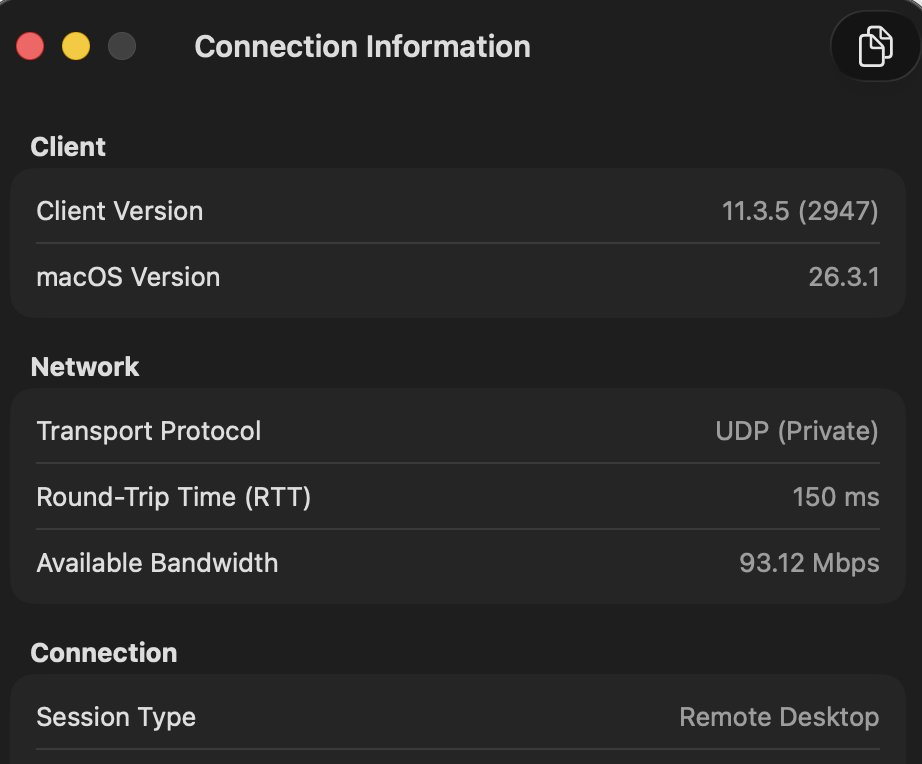
Amazing. From 800 kilobits to 93 megabits on the same internet connection. All of this work had paid off.
What I Learned
The UDP connection pathway already existed! It was just closed off by two conditions in an if statement: one condition totally inside my control by changing a setting, and a second condition seemingly outside of my control. This was the best possible case for binary patching: only a single assembly instruction had to be changed to enable UDP connections.
Reverse engineering binaries and patching them should no longer be considered out of reach of the average software engineer. Claude Code and frontier models are able to do most of the work, though they are far from being able to do so nearly autonomously as they are for simple websites.
Try it out!
The full patcher script, along with the instructions for applying the patch, is available on GitHub: NoahBPeterson/winn-app-udp-unlock.